
206 lines
4.3 KiB
Markdown
206 lines
4.3 KiB
Markdown
# theme.json
|
|
|
|
主题的 theme.json 文件是定制编辑器体验的最佳方式之一,很可能是在使用更复杂解决方案之前最先用到的工具。
|
|
|
|
## 提供默认控件/选项
|
|
|
|
由于 theme.json 作为配置工具,可通过多种方式精细定义可用选项。本节将以双色调为例进行说明,该功能横跨多个区块并支持不同层级的访问权限。
|
|
|
|
*为所有图片相关区块启用核心双色调选项和自定义功能:*
|
|
|
|
```json
|
|
{
|
|
"version": 3,
|
|
"settings": {
|
|
"color": {
|
|
"customDuotone": true,
|
|
"duotone": [
|
|
]
|
|
}
|
|
}
|
|
}
|
|
```
|
|
|
|
*为所有图片相关区块提供主题预定义色彩选项、核心选项及自定义功能:*
|
|
|
|
```json
|
|
{
|
|
"version": 3,
|
|
"settings": {
|
|
"color": {
|
|
"duotone": [
|
|
{
|
|
"colors": [ "#000000", "#ffffff" ],
|
|
"slug": "foreground-and-background",
|
|
"name": "前景色与背景色"
|
|
},
|
|
{
|
|
"colors": [ "#000000", "#ff0200" ],
|
|
"slug": "foreground-and-secondary",
|
|
"name": "前景色与辅助色"
|
|
},
|
|
{
|
|
"colors": [ "#000000", "#7f5dee" ],
|
|
"slug": "foreground-and-tertiary",
|
|
"name": "前景色与第三色"
|
|
},
|
|
]
|
|
}
|
|
}
|
|
}
|
|
```
|
|
|
|
*为文章特色图片区块提供预定义默认选项并开放全部自定义功能:*
|
|
|
|
```json
|
|
{
|
|
"version": 3,
|
|
"settings": {
|
|
"color": {
|
|
"custom": true,
|
|
"customDuotone": true
|
|
},
|
|
"blocks": {
|
|
"core/post-featured-image": {
|
|
"color": {
|
|
"duotone": [
|
|
{
|
|
"colors": [ "#282828", "#ff5837" ],
|
|
"slug": "black-and-orange",
|
|
"name": "黑橙配色"
|
|
},
|
|
{
|
|
"colors": [ "#282828", "#0288d1" ],
|
|
"slug": "black-and-blue",
|
|
"name": "黑蓝配色"
|
|
}
|
|
],
|
|
"customDuotone": true,
|
|
"custom": true
|
|
}
|
|
}
|
|
}
|
|
}
|
|
}
|
|
```
|
|
|
|
*为文章特色图片区块仅提供预定义默认选项和核心选项(禁用自定义功能):*
|
|
|
|
```json
|
|
{
|
|
"version": 3,
|
|
"settings": {
|
|
"color": {
|
|
"custom": true,
|
|
"customDuotone": true
|
|
},
|
|
"blocks": {
|
|
"core/post-featured-image": {
|
|
"color": {
|
|
"duotone": [
|
|
{
|
|
"colors": [ "#282828", "#ff5837" ],
|
|
"slug": "black-and-orange",
|
|
"name": "黑橙配色"
|
|
},
|
|
{
|
|
"colors": [ "#282828", "#0288d1" ],
|
|
"slug": "black-and-blue",
|
|
"name": "黑蓝配色"
|
|
}
|
|
],
|
|
"customDuotone": false,
|
|
"custom": false
|
|
}
|
|
}
|
|
}
|
|
}
|
|
}
|
|
```
|
|
|
|
## 使用 theme.json 限制界面选项
|
|
|
|
### 按区块限制选项
|
|
|
|
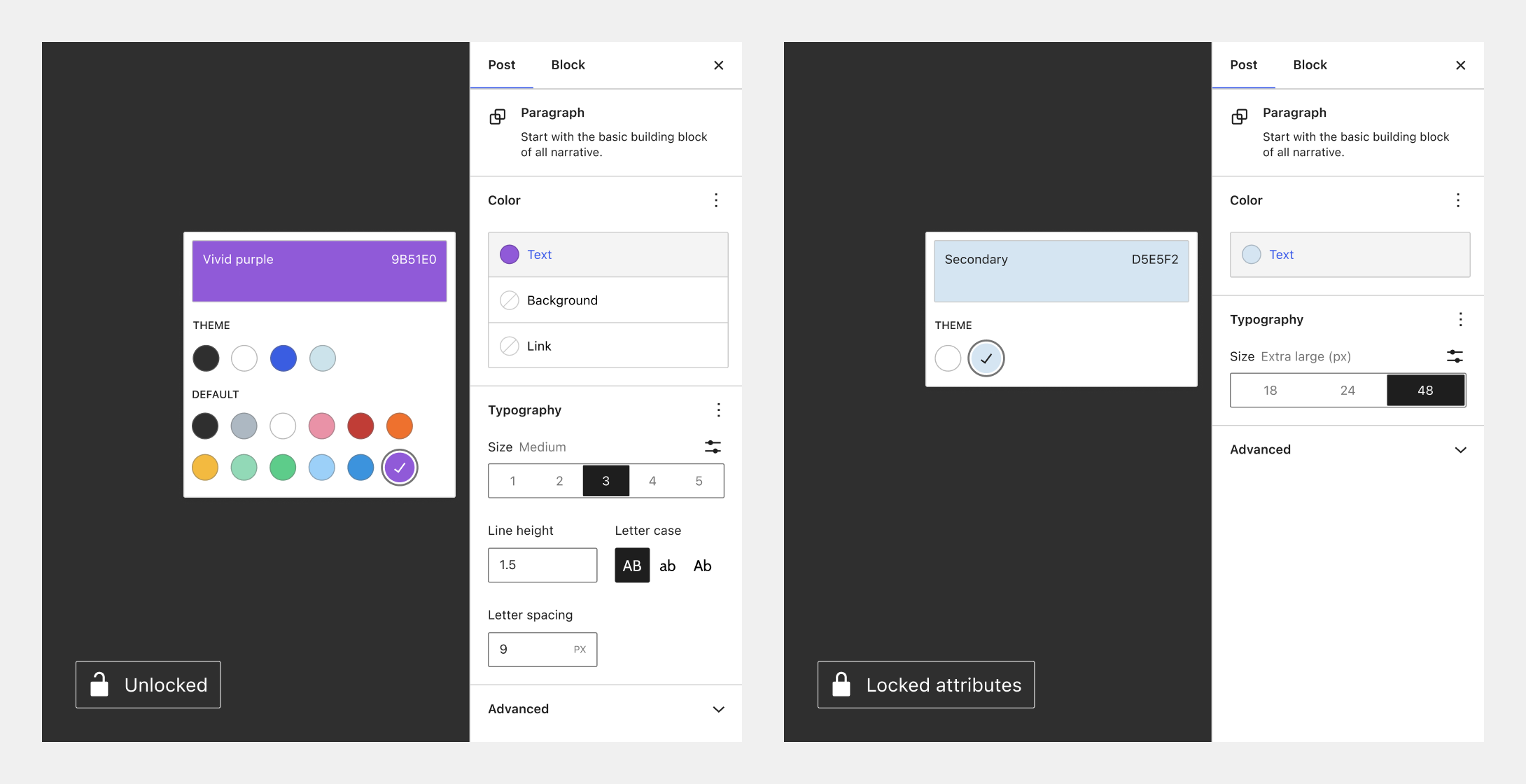
除了定义默认值,使用 theme.json 还可以完全移除某些选项,转而依赖主题预设配置。下图直观展示了同一段落区块的两种极端设置:
|
|
|
|
|
|
|
|
延续双色调的示例,这意味着您可以对图片区块开放全部双色调功能,而仅限制文章特色图片区块的权限:
|
|
|
|
```json
|
|
{
|
|
"version": 3,
|
|
"settings": {
|
|
"color": {
|
|
"custom": true,
|
|
"customDuotone": true
|
|
},
|
|
"blocks": {
|
|
"core/image": {
|
|
"color": {
|
|
"duotone": [],
|
|
"customDuotone": true,
|
|
"custom": true
|
|
}
|
|
},
|
|
"core/post-featured-image": {
|
|
"color": {
|
|
"duotone": [],
|
|
"customDuotone": false,
|
|
"custom": false
|
|
}
|
|
}
|
|
}
|
|
}
|
|
}
|
|
```
|
|
|
|
您可阅读[此文档](/docs/how-to-guides/themes/global-settings-and-styles.md)深入了解如何通过 theme.json 启用/禁用选项。
|
|
|
|
### 禁用继承默认布局
|
|
|
|
如需对群组区块等容器区块禁用“继承默认布局”设置,请移除以下配置段:
|
|
|
|
```json
|
|
"layout": {
|
|
"contentSize": null,
|
|
"wideSize": null
|
|
},
|
|
```
|
|
|
|
### 全局限制选项
|
|
|
|
在区块主题或经典主题中使用 theme.json 时,以下设置将全局禁用默认颜色与排版控件,大幅限制可用功能:
|
|
|
|
```json
|
|
{
|
|
"version": 3,
|
|
"settings": {
|
|
"layout": {
|
|
"contentSize": "750px"
|
|
},
|
|
"color": {
|
|
"background": false,
|
|
"custom": false,
|
|
"customDuotone": false,
|
|
"customGradient": false,
|
|
"defaultGradients": false,
|
|
"defaultPalette": false,
|
|
"text": false
|
|
},
|
|
"typography": {
|
|
"customFontSize": false,
|
|
"dropCap": false,
|
|
"fontStyle": false,
|
|
"fontWeight": false,
|
|
"letterSpacing": false,
|
|
"lineHeight": false,
|
|
"textDecoration": false,
|
|
"textTransform": false
|
|
}
|
|
}
|
|
}
|
|
```
|
|
|
|
若需启用上述某项功能,只需将对应值改为 `true` 即可实现更精细的控制。 |