
58 lines
7.2 KiB
Markdown
58 lines
7.2 KiB
Markdown
## 扩展资源
|
||
|
||
本手册应被视为区块开发相关领域的权威资源,但以下其他资源也能为您提供帮助:
|
||
|
||
- **[WordPress 开发者博客](https://developer.wordpress.org/news/):** 持续更新的技术文章库,涵盖区块开发专题及各类应用场景。该博客也是[跟进WordPress最新动态](https://developer.wordpress.org/news/tag/roundup/)的理想渠道。
|
||
- **[Learn WordPress](https://learn.wordpress.org/):** WordPress官方学习中心,提供[《区块开发入门:创建你的第一个自定义区块》](https://learn.wordpress.org/course/introduction-to-block-development-build-your-first-custom-block/)、[《将简码转换为区块》](https://learn.wordpress.org/course/converting-a-shortcode-to-a-block/)、[《使用WordPress数据层》](https://learn.wordpress.org/course/using-the-wordpress-data-layer/)等系列课程。
|
||
- **[WordPress.tv](https://wordpress.tv/):** 由WordPress社区维护的视频资源库,收录WordCamp演讲实录及在线研讨会录像。您一定能在此找到关于[区块开发](https://wordpress.tv/?s=block%20development&sort=newest)或[区块编辑器](https://wordpress.tv/?s=block%20editor&sort=relevance)的学习资料。
|
||
- **[Gutenberg代码库](https://github.com/WordPress/gutenberg/):** 区块编辑器的开发在GitHub上进行。该仓库包含[`block-library`](https://github.com/WordPress/gutenberg/tree/trunk/packages/block-library/src)(核心区块)与[`components`](https://github.com/WordPress/gutenberg/tree/trunk/packages/components)(通用UI组件)等重要代码包。*[block-development-examples](https://github.com/WordPress/block-development-examples)代码库也是极佳的参考资源。*
|
||
- **[终端用户文档](https://wordpress.org/documentation/):** 该文档站点面向终端用户(非开发者),同样收录了[区块编辑器](https://wordpress.org/documentation/category/block-editor/)与[区块操作指南](https://wordpress.org/documentation/article/work-with-blocks/)相关内容。
|
||
|
||
## 确认您的需求场景
|
||
|
||
《区块编辑器手册》专为基于区块编辑器进行创作和开发的用户设计。请注意,[开发者资源中心](https://developer.wordpress.org/)还提供了多本可能对您有益的手册:
|
||
|
||
- [主题开发手册](https://developer.wordpress.org/themes)
|
||
- [插件开发手册](https://developer.wordpress.org/plugins)
|
||
- [通用API手册](https://developer.wordpress.org/apis)
|
||
- [高级管理手册](https://developer.wordpress.org/advanced-administration)
|
||
- [REST API手册](https://developer.wordpress.org/rest-api/)
|
||
- [编码标准手册](https://developer.wordpress.org/coding-standards)
|
||
|
||
# 区块编辑器手册
|
||
|
||
欢迎使用区块编辑器手册。
|
||
|
||
[**区块编辑器**](https://wordpress.org/gutenberg/) 是用于构建和发布 WordPress 网站的现代范式。它采用模块化的**区块**系统来创作和格式化内容,旨在为网站和数字产品创建丰富灵活的布局。
|
||
|
||
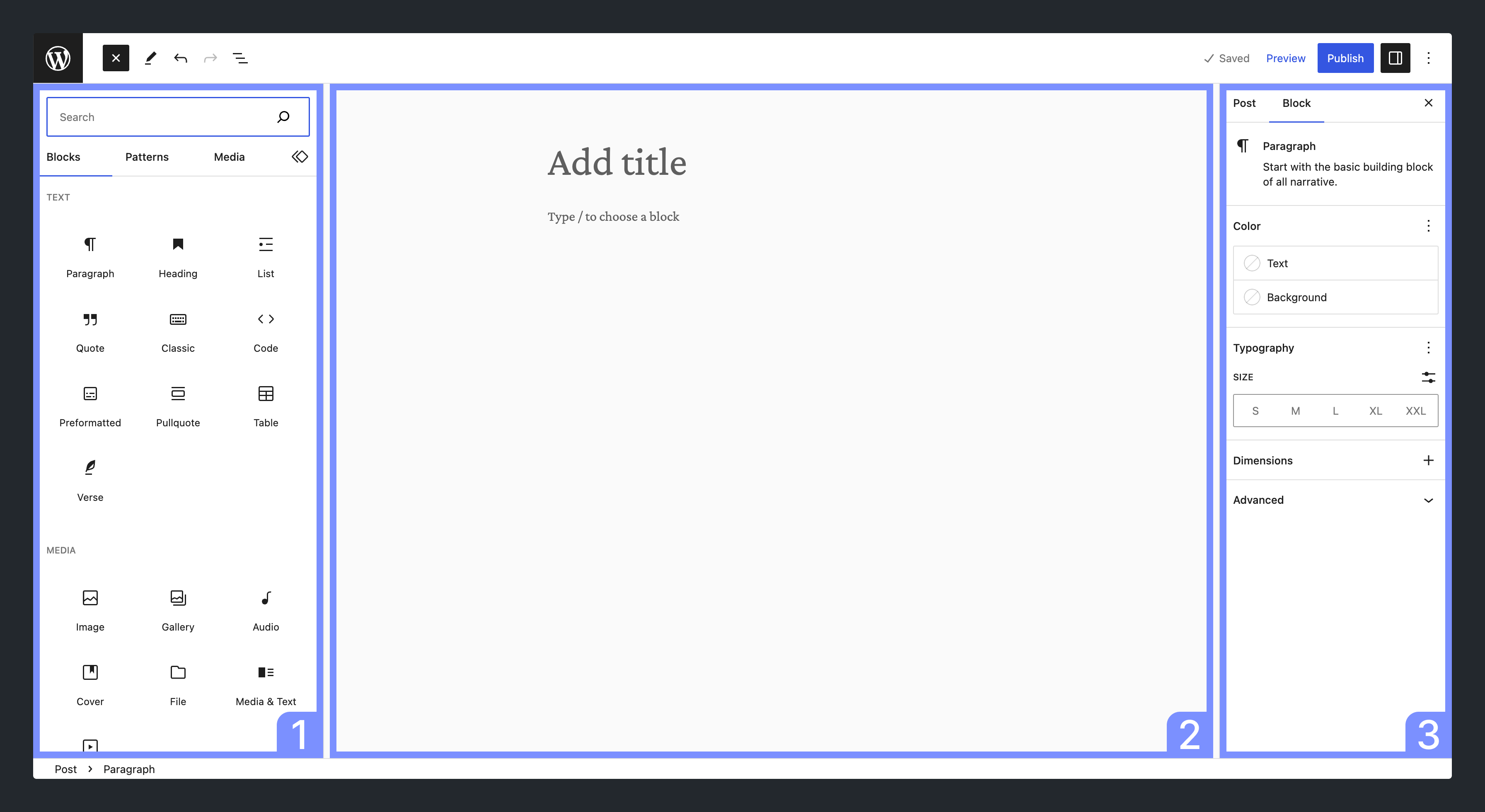
区块编辑器包含以下几个主要元素,如下图所示:
|
||
|
||
|
||
|
||
图中高亮显示的元素包括:
|
||
|
||
1. **插入器:** 用于将区块插入内容画布的面板
|
||
2. **内容画布:** 内容编辑器,承载使用区块创建的内容
|
||
3. **设置面板:** 配置选定区块设置或文章设置的面板
|
||
|
||
通过区块编辑器,您可以使用区块以模块化方式创建内容。WordPress 默认提供多种[区块](https://developer.wordpress.org/block-editor/reference-guides/core-blocks/),您也可以[创建自己的区块](https://developer.wordpress.org/block-editor/getting-started/create-block/)。
|
||
|
||
[区块](https://developer.wordpress.org/block-editor/explanations/architecture/key-concepts/#blocks)是一个独立元素,例如段落、标题、媒体或嵌入内容。每个区块都被视为具有独立编辑和格式控件的单独元素。当所有这些组件组合在一起时,就构成了页面或文章的内容,随后这些内容将[存储到 WordPress 数据库](https://developer.wordpress.org/block-editor/explanations/architecture/data-flow/#serialization-and-parsing)中。
|
||
|
||
区块编辑器是 [**Gutenberg 项目**](https://developer.wordpress.org/block-editor/getting-started/faq/#what-is-gutenberg)的工作成果,该项目旨在彻底改变 WordPress 的编辑体验。
|
||
|
||
除了通过可视化内容创建工具提供[增强的编辑体验](https://wordpress.org/gutenberg/)外,区块编辑器还是一个强大的开发平台,拥有[丰富的 API 功能集](https://developer.wordpress.org/block-editor/reference-guides/),可通过无数种方式进行操作和扩展。
|
||
|
||
## 手册使用指南
|
||
|
||
本手册主要关注区块开发,分为五个主要部分:
|
||
|
||
- **[入门指南](https://developer.wordpress.org/block-editor/getting-started/):** 适合刚接触区块开发的用户,您可以在此设置[开发环境](https://developer.wordpress.org/block-editor/getting-started/devenv/)并学习[区块开发基础知识](https://developer.wordpress.org/block-editor/getting-started/fundamentals/)。其中的[快速入门指南](https://developer.wordpress.org/block-editor/getting-started/quick-start-guide/)和[教程:构建您的第一个区块](https://developer.wordpress.org/block-editor/getting-started/tutorial/)是开始学习区块开发的理想起点。
|
||
|
||
- **[操作指南](https://developer.wordpress.org/block-editor/how-to-guides/):** 在此部分,您可以基于入门指南所学知识,进一步学习如何解决特定问题。您还可以找到教程和示例代码,以便在自己的项目中重复使用,例如[处理 WordPress 数据](https://developer.wordpress.org/block-editor/how-to-guides/data-basics/)或[优化编辑器体验](https://developer.wordpress.org/block-editor/how-to-guides/curating-the-editor-experience/)。
|
||
|
||
- **[参考指南](https://developer.wordpress.org/block-editor/reference-guides/):** 这是手册的核心部分,您可以在此深入了解细节,查找正在使用或需要了解的特定 API 的详细信息。[区块 API 参考](https://developer.wordpress.org/block-editor/reference-guides/block-api/)涵盖了您可能需要对区块执行的大部分操作,每个[组件](https://developer.wordpress.org/block-editor/reference-guides/components/)和[包](https://developer.wordpress.org/block-editor/reference-guides/packages/)也在此处记录。_组件还通过 [Storybook](https://wordpress.github.io/gutenberg/?path=/story/docs-introduction--page) 进行文档记录。_
|
||
|
||
- **[原理解释](https://developer.wordpress.org/block-editor/explanations/):** 此部分让您能够更深入地学习,通过对区块编辑器[架构](https://developer.wordpress.org/block-editor/explanations/architecture/)的理论理解来巩固您的实践知识。
|
||
|
||
- **[贡献者指南](https://developer.wordpress.org/block-editor/contributors/):** Gutenberg 是开源软件,欢迎所有人为此项目做出贡献。此部分详细说明了如何贡献,无论是通过[代码](https://developer.wordpress.org/block-editor/contributors/code/)、[设计](https://developer.wordpress.org/block-editor/contributors/design/)、[文档](https://developer.wordpress.org/block-editor/contributors/documentation/)还是其他方式。 |