395 lines
11 KiB
Markdown
395 lines
11 KiB
Markdown

|
# 构建创建页面表单
|
|||
|
|
|
|||
|
|
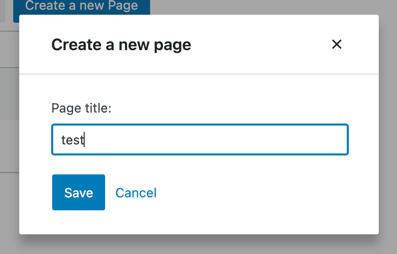
在[上一章节](/docs/how-to-guides/data-basics/3-building-an-edit-form.md)中我们创建了*编辑页面*功能,本章节我们将新增*创建页面*功能。以下是我们即将构建功能的预览:
|
|||
|
|
|
|||
|
|
|
|||
|
|
|
|||
|
|
### 步骤一:添加“创建新页面”按钮
|
|||
|
|
|
|||
|
|
首先我们构建一个用于显示创建页面表单的按钮,这与我们在[第三章节](/docs/how-to-guides/data-basics/3-building-an-edit-form.md)构建的编辑按钮类似:
|
|||
|
|
|
|||
|
|
```js
|
|||
|
|
import { useDispatch } from '@wordpress/data';
|
|||
|
|
import { Button, Modal, TextControl } from '@wordpress/components';
|
|||
|
|
|
|||
|
|
function CreatePageButton() {
|
|||
|
|
const [isOpen, setOpen] = useState( false );
|
|||
|
|
const openModal = () => setOpen( true );
|
|||
|
|
const closeModal = () => setOpen( false );
|
|||
|
|
return (
|
|||
|
|
<>
|
|||
|
|
<Button onClick={ openModal } variant="primary">
|
|||
|
|
创建新页面
|
|||
|
|
</Button>
|
|||
|
|
{ isOpen && (
|
|||
|
|
<Modal onRequestClose={ closeModal } title="创建新页面">
|
|||
|
|
<CreatePageForm
|
|||
|
|
onCancel={ closeModal }
|
|||
|
|
onSaveFinished={ closeModal }
|
|||
|
|
/>
|
|||
|
|
</Modal>
|
|||
|
|
) }
|
|||
|
|
</>
|
|||
|
|
);
|
|||
|
|
}
|
|||
|
|
|
|||
|
|
function CreatePageForm() {
|
|||
|
|
// 暂时留空
|
|||
|
|
return <div/>;
|
|||
|
|
}
|
|||
|
|
```
|
|||
|
|
|
|||
|
|
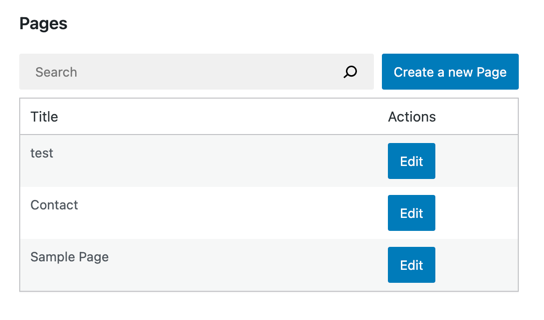
很好!现在让`MyFirstApp`显示我们全新的按钮:
|
|||
|
|
|
|||
|
|
```js
|
|||
|
|
function MyFirstApp() {
|
|||
|
|
// ...
|
|||
|
|
return (
|
|||
|
|
<div>
|
|||
|
|
<div className="list-controls">
|
|||
|
|
<SearchControl onChange={ setSearchTerm } value={ searchTerm }/>
|
|||
|
|
<CreatePageButton/>
|
|||
|
|
</div>
|
|||
|
|
<PagesList hasResolved={ hasResolved } pages={ pages }/>
|
|||
|
|
</div>
|
|||
|
|
);
|
|||
|
|
}
|
|||
|
|
```
|
|||
|
|
|
|||
|
|
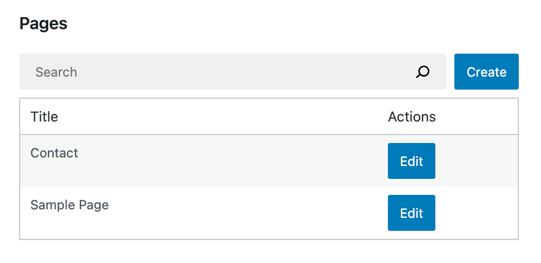
最终效果如下所示:
|
|||
|
|
|
|||
|
|
|
|||
|
|
|
|||
|
|
### 步骤二:提取受控页面表单
|
|||
|
|
|
|||
|
|
按钮就位后,我们可以全力构建表单。本教程重点在于数据管理,因此不会构建完整的页面编辑器。表单将仅包含一个字段:文章标题。
|
|||
|
|
|
|||
|
|
幸运的是,我们在[第三章节](/docs/how-to-guides/data-basics/3-building-an-edit-form.md)构建的`EditPageForm`已经实现了80%的功能。大部分用户界面已就绪,我们将在`CreatePageForm`中复用这些组件。首先将表单UI提取为独立组件:
|
|||
|
|
|
|||
|
|
```js
|
|||
|
|
function EditPageForm( { pageId, onCancel, onSaveFinished } ) {
|
|||
|
|
// ...
|
|||
|
|
return (
|
|||
|
|
<PageForm
|
|||
|
|
title={ page.title }
|
|||
|
|
onChangeTitle={ handleChange }
|
|||
|
|
hasEdits={ hasEdits }
|
|||
|
|
lastError={ lastError }
|
|||
|
|
isSaving={ isSaving }
|
|||
|
|
onCancel={ onCancel }
|
|||
|
|
onSave={ handleSave }
|
|||
|
|
/>
|
|||
|
|
);
|
|||
|
|
}
|
|||
|
|
|
|||
|
|
function PageForm( { title, onChangeTitle, hasEdits, lastError, isSaving, onCancel, onSave } ) {
|
|||
|
|
return (
|
|||
|
|
<div className="my-gutenberg-form">
|
|||
|
|
<TextControl
|
|||
|
|
__nextHasNoMarginBottom
|
|||
|
|
__next40pxDefaultSize
|
|||
|
|
label="页面标题:"
|
|||
|
|
value={ title }
|
|||
|
|
onChange={ onChangeTitle }
|
|||
|
|
/>
|
|||
|
|
{ lastError ? (
|
|||
|
|
<div className="form-error">错误:{ lastError.message }</div>
|
|||
|
|
) : (
|
|||
|
|
false
|
|||
|
|
) }
|
|||
|
|
<div className="form-buttons">
|
|||
|
|
<Button
|
|||
|
|
onClick={ onSave }
|
|||
|
|
variant="primary"
|
|||
|
|
disabled={ !hasEdits || isSaving }
|
|||
|
|
>
|
|||
|
|
{ isSaving ? (
|
|||
|
|
<>
|
|||
|
|
<Spinner/>
|
|||
|
|
保存中
|
|||
|
|
</>
|
|||
|
|
) : '保存' }
|
|||
|
|
</Button>
|
|||
|
|
<Button
|
|||
|
|
onClick={ onCancel }
|
|||
|
|
variant="tertiary"
|
|||
|
|
disabled={ isSaving }
|
|||
|
|
>
|
|||
|
|
取消
|
|||
|
|
</Button>
|
|||
|
|
</div>
|
|||
|
|
</div>
|
|||
|
|
);
|
|||
|
|
}
|
|||
|
|
```
|
|||
|
|
|
|||
|
|
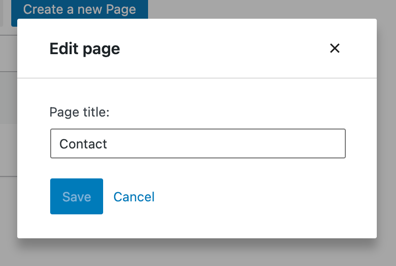
这段代码的质量优化不应改变应用程序的任何功能。让我们尝试编辑页面来确认:
|
|||
|
|
|
|||
|
|
|
|||
|
|
|
|||
|
|
很好!编辑表单依然存在,现在我们有了构建新`CreatePageForm`的基础模块。
|
|||
|
|
|
|||
|
|
### 整合所有代码
|
|||
|
|
|
|||
|
|
以下是本章节构建的全部内容:
|
|||
|
|
|
|||
|
|
```js
|
|||
|
|
function CreatePageForm( { onCancel, onSaveFinished } ) {
|
|||
|
|
const [title, setTitle] = useState();
|
|||
|
|
const { lastError, isSaving } = useSelect(
|
|||
|
|
( select ) => ( {
|
|||
|
|
lastError: select( coreDataStore )
|
|||
|
|
.getLastEntitySaveError( 'postType', 'page' ),
|
|||
|
|
isSaving: select( coreDataStore )
|
|||
|
|
.isSavingEntityRecord( 'postType', 'page' ),
|
|||
|
|
} ),
|
|||
|
|
[]
|
|||
|
|
);
|
|||
|
|
|
|||
|
|
const { saveEntityRecord } = useDispatch( coreDataStore );
|
|||
|
|
const handleSave = async () => {
|
|||
|
|
const savedRecord = await saveEntityRecord(
|
|||
|
|
'postType',
|
|||
|
|
'page',
|
|||
|
|
{ title, status: 'publish' }
|
|||
|
|
);
|
|||
|
|
if ( savedRecord ) {
|
|||
|
|
onSaveFinished();
|
|||
|
|
}
|
|||
|
|
};
|
|||
|
|
|
|||
|
|
return (
|
|||
|
|
<PageForm
|
|||
|
|
title={ title }
|
|||
|
|
onChangeTitle={ setTitle }
|
|||
|
|
hasEdits={ !!title }
|
|||
|
|
onSave={ handleSave }
|
|||
|
|
lastError={ lastError }
|
|||
|
|
onCancel={ onCancel }
|
|||
|
|
isSaving={ isSaving }
|
|||
|
|
/>
|
|||
|
|
);
|
|||
|
|
}
|
|||
|
|
|
|||
|
|
function EditPageForm( { pageId, onCancel, onSaveFinished } ) {
|
|||
|
|
const { page, lastError, isSaving, hasEdits } = useSelect(
|
|||
|
|
( select ) => ( {
|
|||
|
|
page: select( coreDataStore ).getEditedEntityRecord( 'postType', 'page', pageId ),
|
|||
|
|
lastError: select( coreDataStore ).getLastEntitySaveError( 'postType', 'page', pageId ),
|
|||
|
|
isSaving: select( coreDataStore ).isSavingEntityRecord( 'postType', 'page', pageId ),
|
|||
|
|
hasEdits: select( coreDataStore ).hasEditsForEntityRecord( 'postType', 'page', pageId ),
|
|||
|
|
} ),
|
|||
|
|
[pageId]
|
|||
|
|
);
|
|||
|
|
|
|||
|
|
const { saveEditedEntityRecord, editEntityRecord } = useDispatch( coreDataStore );
|
|||
|
|
const handleSave = async () => {
|
|||
|
|
const savedRecord = await saveEditedEntityRecord( 'postType', 'page', pageId );
|
|||
|
|
if ( savedRecord ) {
|
|||
|
|
onSaveFinished();
|
|||
|
|
}
|
|||
|
|
};
|
|||
|
|
const handleChange = ( title ) => editEntityRecord( 'postType', 'page', page.id, { title } );
|
|||
|
|
|
|||
|
|
return (
|
|||
|
|
<PageForm
|
|||
|
|
title={ page.title }
|
|||
|
|
onChangeTitle={ handleChange }
|
|||
|
|
hasEdits={ hasEdits }
|
|||
|
|
lastError={ lastError }
|
|||
|
|
isSaving={ isSaving }
|
|||
|
|
onCancel={ onCancel }
|
|||
|
|
onSave={ handleSave }
|
|||
|
|
/>
|
|||
|
|
);
|
|||
|
|
}
|
|||
|
|
|
|||
|
|
function PageForm( { title, onChangeTitle, hasEdits, lastError, isSaving, onCancel, onSave } ) {
|
|||
|
|
return (
|
|||
|
|
<div className="my-gutenberg-form">
|
|||
|
|
<TextControl
|
|||
|
|
__nextHasNoMarginBottom
|
|||
|
|
__next40pxDefaultSize
|
|||
|
|
label="页面标题:"
|
|||
|
|
value={ title }
|
|||
|
|
onChange={ onChangeTitle }
|
|||
|
|
/>
|
|||
|
|
{ lastError ? (
|
|||
|
|
<div className="form-error">错误:{ lastError.message }</div>
|
|||
|
|
) : (
|
|||
|
|
false
|
|||
|
|
) }
|
|||
|
|
<div className="form-buttons">
|
|||
|
|
<Button
|
|||
|
|
onClick={ onSave }
|
|||
|
|
variant="primary"
|
|||
|
|
disabled={ !hasEdits || isSaving }
|
|||
|
|
>
|
|||
|
|
{ isSaving ? (
|
|||
|
|
<>
|
|||
|
|
<Spinner/>
|
|||
|
|
保存中
|
|||
|
|
</>
|
|||
|
|
) : '保存' }
|
|||
|
|
</Button>
|
|||
|
|
<Button
|
|||
|
|
onClick={ onCancel }
|
|||
|
|
variant="tertiary"
|
|||
|
|
disabled={ isSaving }
|
|||
|
|
>
|
|||
|
|
取消
|
|||
|
|
</Button>
|
|||
|
|
</div>
|
|||
|
|
</div>
|
|||
|
|
);
|
|||
|
|
}
|
|||
|
|
```
|
|||
|
|
|
|||
|
|
现在只需刷新页面即可体验表单功能:
|
|||
|
|
|
|||
|
|

|
|||
|
|
|
|||
|
|
## 后续步骤
|
|||
|
|
|
|||
|
|
* **下一章节:** [添加删除按钮](/docs/how-to-guides/data-basics/5-adding-a-delete-button.md)
|
|||
|
|
* **上一章节:** [构建编辑表单](/docs/how-to-guides/data-basics/3-building-an-edit-form.md)
|
|||
|
|
* (可选)在 block-development-examples 代码库中查看[完整应用](https://github.com/WordPress/block-development-examples/tree/trunk/plugins/data-basics-59c8f8)
|
|||
|
|
|
|||
|
|
### 步骤三:构建CreatePageForm组件
|
|||
|
|
|
|||
|
|
`CreatePageForm`组件只需提供渲染`PageForm`组件所需的七个属性:
|
|||
|
|
|
|||
|
|
* 标题
|
|||
|
|
* 标题变更处理函数
|
|||
|
|
* 编辑状态标识
|
|||
|
|
* 最后错误信息
|
|||
|
|
* 保存状态标识
|
|||
|
|
* 取消处理函数
|
|||
|
|
* 保存处理函数
|
|||
|
|
|
|||
|
|
具体实现如下:
|
|||
|
|
|
|||
|
|
#### 标题、标题变更处理、编辑状态
|
|||
|
|
|
|||
|
|
`EditPageForm`组件更新并保存的是Redux状态中已存在的实体记录,因此我们依赖`editedEntityRecords`选择器。
|
|||
|
|
|
|||
|
|
而`CreatePageForm`不存在预先的实体记录,只有空表单。用户输入的内容仅存在于本地表单,可通过React的`useState`钩子进行跟踪:
|
|||
|
|
|
|||
|
|
```js
|
|||
|
|
function CreatePageForm( { onCancel, onSaveFinished } ) {
|
|||
|
|
const [title, setTitle] = useState();
|
|||
|
|
const handleChange = ( title ) => setTitle( title );
|
|||
|
|
return (
|
|||
|
|
<PageForm
|
|||
|
|
title={ title }
|
|||
|
|
onChangeTitle={ setTitle }
|
|||
|
|
hasEdits={ !!title }
|
|||
|
|
{ /* 其他属性 */ }
|
|||
|
|
/>
|
|||
|
|
);
|
|||
|
|
}
|
|||
|
|
```
|
|||
|
|
|
|||
|
|
#### 保存处理、取消处理
|
|||
|
|
|
|||
|
|
在`EditPageForm`中,我们通过`saveEditedEntityRecord('postType', 'page', pageId )`操作保存Redux状态中的编辑内容。
|
|||
|
|
|
|||
|
|
但`CreatePageForm`既无Redux状态中的编辑内容,也无pageId。此时需要调用的是[`saveEntityRecord`](https://developer.wordpress.org/block-editor/reference-guides/data/data-core/#saveentityrecord)操作(名称中不含Edited),它接收的是代表新实体记录的对象而非pageId。
|
|||
|
|
|
|||
|
|
传递给`saveEntityRecord`的数据会通过POST请求发送到对应REST API接口。例如执行以下操作:
|
|||
|
|
|
|||
|
|
```js
|
|||
|
|
saveEntityRecord( 'postType', 'page', { title: "测试页面" } );
|
|||
|
|
```
|
|||
|
|
|
|||
|
|
将向[WordPress页面REST API接口](/wp/v2/pages)发起POST请求,请求体中包含单个字段:`title=测试页面`。
|
|||
|
|
|
|||
|
|
现在我们将其应用到`CreatePageForm`:
|
|||
|
|
|
|||
|
|
```js
|
|||
|
|
function CreatePageForm( { onSaveFinished, onCancel } ) {
|
|||
|
|
// ...
|
|||
|
|
const { saveEntityRecord } = useDispatch( coreDataStore );
|
|||
|
|
const handleSave = async () => {
|
|||
|
|
const savedRecord = await saveEntityRecord(
|
|||
|
|
'postType',
|
|||
|
|
'page',
|
|||
|
|
{ title }
|
|||
|
|
);
|
|||
|
|
if ( savedRecord ) {
|
|||
|
|
onSaveFinished();
|
|||
|
|
}
|
|||
|
|
};
|
|||
|
|
return (
|
|||
|
|
<PageForm
|
|||
|
|
{ /* 其他属性 */ }
|
|||
|
|
onSave={ handleSave }
|
|||
|
|
onCancel={ onCancel }
|
|||
|
|
/>
|
|||
|
|
);
|
|||
|
|
}
|
|||
|
|
```
|
|||
|
|
|
|||
|
|
还需注意:新建页面默认不会被`PagesList`获取。根据REST API文档,`/wp/v2/pages`接口在创建(POST请求)时默认生成`status=draft`的页面,但返回(GET请求)的是`status=publish`的页面。解决方案是显式传递status参数:
|
|||
|
|
|
|||
|
|
```js
|
|||
|
|
function CreatePageForm( { onSaveFinished, onCancel } ) {
|
|||
|
|
// ...
|
|||
|
|
const { saveEntityRecord } = useDispatch( coreDataStore );
|
|||
|
|
const handleSave = async () => {
|
|||
|
|
const savedRecord = await saveEntityRecord(
|
|||
|
|
'postType',
|
|||
|
|
'page',
|
|||
|
|
{ title, status: 'publish' }
|
|||
|
|
);
|
|||
|
|
if ( savedRecord ) {
|
|||
|
|
onSaveFinished();
|
|||
|
|
}
|
|||
|
|
};
|
|||
|
|
return (
|
|||
|
|
<PageForm
|
|||
|
|
{ /* 其他属性 */ }
|
|||
|
|
onSave={ handleSave }
|
|||
|
|
onCancel={ onCancel }
|
|||
|
|
/>
|
|||
|
|
);
|
|||
|
|
}
|
|||
|
|
```
|
|||
|
|
|
|||
|
|
请将此更改应用到本地的`CreatePageForm`组件,接下来处理剩余两个属性。
|
|||
|
|
|
|||
|
|
#### 最后错误、保存状态
|
|||
|
|
|
|||
|
|
`EditPageForm`通过`getLastEntitySaveError`和`isSavingEntityRecord`选择器获取错误和进度信息,两者都传递三个参数:`( 'postType', 'page', pageId )`。
|
|||
|
|
|
|||
|
|
但`CreatePageForm`没有pageId参数。此时可省略pageId参数来获取未指定ID的实体记录信息(即新建记录)。`useSelect`调用与`EditPageForm`非常相似:
|
|||
|
|
|
|||
|
|
```js
|
|||
|
|
function CreatePageForm( { onCancel, onSaveFinished } ) {
|
|||
|
|
// ...
|
|||
|
|
const { lastError, isSaving } = useSelect(
|
|||
|
|
( select ) => ( {
|
|||
|
|
// 注意省略了pageId参数:
|
|||
|
|
lastError: select( coreDataStore )
|
|||
|
|
.getLastEntitySaveError( 'postType', 'page' ),
|
|||
|
|
// 注意省略了pageId参数
|
|||
|
|
isSaving: select( coreDataStore )
|
|||
|
|
.isSavingEntityRecord( 'postType', 'page' ),
|
|||
|
|
} ),
|
|||
|
|
[]
|
|||
|
|
);
|
|||
|
|
// ...
|
|||
|
|
return (
|
|||
|
|
<PageForm
|
|||
|
|
{ /* 其他属性 */ }
|
|||
|
|
lastError={ lastError }
|
|||
|
|
isSaving={ isSaving }
|
|||
|
|
/>
|
|||
|
|
);
|
|||
|
|
}
|
|||
|
|
```
|
|||
|
|
|
|||
|
|
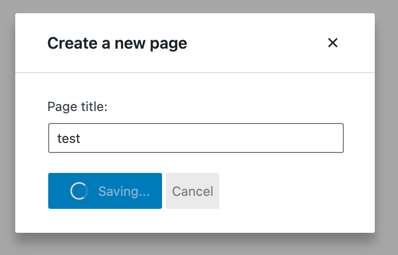
大功告成!以下是我们新表单的实际运行效果:
|
|||
|
|
|
|||
|
|
|
|||
|
|
|